You can now cancel scheduled carousel posts right from the carousel listing page. We've also improved the display to show scheduled publish times instead of creation dates, making it easier to manage your content calendar.
The 'Pending' filter on your Published page now correctly shows posts that are currently being processed, so you won't lose track of posts that are in progress.
Your scheduled posts now publish with slight random timing variations to make your content appear more natural and avoid automated detection systems.
Your weekly app reports now include intelligent highlights that automatically call out milestones, significant changes, and monthly records to help you quickly spot what matters most.
You can now send your videos to TikTok as drafts instead of publishing them immediately. Drafts will appear in your TikTok app where you can edit and post them manually.
X (Twitter) and LinkedIn post statistics are now displaying correctly instead of showing zero for all metrics.
Click any carousel thumbnail to open a beautiful lightbox viewer where you can browse through all images with arrow keys, thumbnails, and smooth navigation.
You'll now receive notifications in-app, via email, and in Slack when your posts fail to publish due to expired social media tokens or other issues that need your attention.
Slack notifications now show image thumbnails for your posts, making it easier to see what was published at a glance. We've also streamlined notifications so scheduled posts won't send duplicate messages.
Your dashboard now shows your most recent posts for each app and project, with clickable platform badges that link directly to your published content on Instagram, Facebook, TikTok, and more. Posts are organized by recency to help you stay on top of your publishing activity.
AI assistants like ChatGPT, Claude, and Perplexity can now better discover and recommend MakePost with comprehensive product documentation that helps them understand all features and capabilities.
Added a 'last posted' column to your apps table with color-coded indicators to quickly see which apps need attention and when your next posts are scheduled.
The dashboard now shows your most recent published posts for each app and project, including post titles, publication times, and next scheduled posts. Posts are sorted by most recent activity to help you stay on top of your content.
Connect your Slack workspace to get real-time notifications when posts are published, scheduled, or when you receive new app reviews. You can filter notifications by specific apps and customize your preferences.
When viewing content for a specific platform, the page title now shows which platform you're focused on (like "Publishing — Facebook"). Platform filter badges also now use each platform's signature colors for a more native feel.
Click on any image or video thumbnail in your publishing table to see a quick preview. Videos load only when you click to keep the page fast and responsive.
Image posts now show their actual thumbnails instead of generic icons, making it easier to identify your content at a glance. Pages load faster with optimized video previews.
Platform cards are now clickable filters that let you quickly view posts for specific platforms like Instagram or TikTok. The page title updates to show which platform you've selected, and each platform uses its signature color when active.
Fixed issues with deleting unused media files and improved the confirmation process for better reliability.
Fixed pagination issues when filtering posts by status or platform - filtered results now display on the correct pages.
Your dashboard now shows a Published Posts metric card with total count, trend chart, and percentage change to track your publishing activity over time.
A new "Unused" tab on the Posts page helps you find and delete uploaded images that aren't being used in any posts, keeping your media library organized.
You can now perform bulk operations to save time: publish up to 20 posts at once, upload up to 20 images/videos simultaneously, and cancel or reschedule up to 50 scheduled posts in a single action.
Fixed an issue where filtering posts by status or platform would show empty pages or incorrect results due to pagination problems.
Added a new analytics card to your dashboard and stats page showing your total published posts count with a visual trend chart and percentage changes over time.
The Publishing page now loads much faster with improved thumbnail display and better account information. You'll see account avatars and names alongside platform details for easier management.
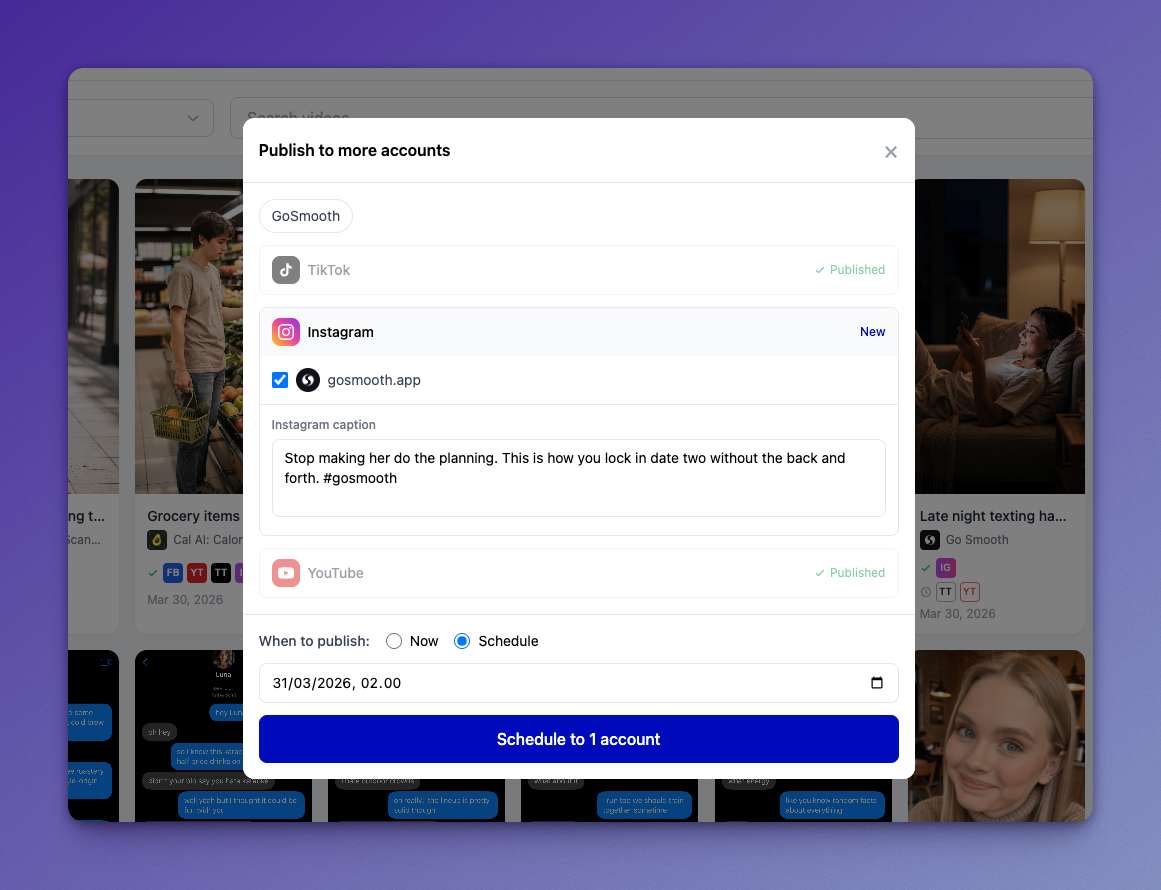
You can now easily republish your videos to additional accounts with custom captions for each platform. Simply click 'Publish to more' on any video to select new accounts and customize your messaging per platform.
Fixed an issue where cover image extraction failed for HEVC videos and improved error handling for video processing.
You can now set custom cover images for videos when uploading via API. Extract a frame at a specific timestamp or provide your own cover image URL.
Upload images and videos directly from your device instead of providing URLs. Works across the web app, API, and MCP tools.
Your dashboard now updates automatically when content is created, updated, or deleted. No more manual page refreshes to see the latest changes.
You can now edit the caption of scheduled posts without having to cancel and recreate them. Find the edit option in the three-dot menu on your content cards.
Resolved an issue with World Bank economic data that was preventing some content features from working properly.
When you delete a post, you'll stay on the same page instead of being redirected elsewhere, making content management more seamless.
Drafts now show which platforms they're targeted for with visual badges, and the draft creation process has been streamlined for both manual and API workflows.
Launch of a comprehensive API that lets you publish, schedule, and manage content programmatically. Perfect for integrating with automation tools like Zapier, n8n, or custom scripts.
New app imports now sync a full year of analytics data instead of just 30 days, and you can view up to 365 days of historical performance data.
Track your newest content alongside your best-performing posts. Fresh posts appear immediately so you can monitor early performance metrics.
Added 6 new MCP tools for publishing content, managing drafts, and uploading images, bringing the total to 25 tools for AI-powered content workflows.
The reviews section now only shows actual iOS apps with App Store reviews, filtering out user-created projects that don't have reviews.
The sidebar now collapses to save space, with a new expandable Create menu and quick access to the theme toggle. Content counts have been moved to page headers for less clutter.
When you connect a new app, we now import a full year of analytics data instead of just 30 days, so you can see your complete performance history immediately.
Draft posts and carousels can now be edited and updated. Find your drafts in the new Drafts tabs on the Posts and Carousels pages, make changes, and publish when you're ready.
Resolved dark mode display problems in the calendar and fixed several publishing errors that could occur with text and image posts.
Account group pills now highlight when active and intelligently skip disabled platforms when applied, making it easier to publish to your preferred account combinations.
Content is now organized into separate pages for Videos, Carousels, and Posts. Each page shows content counts and includes filtering, searching, and better navigation.
Add a personal touch by uploading your own profile photo in Settings. Supports PNG, JPEG, and WebP files up to 5MB.
Set specific publish times for your posts and carousels, just like videos. Choose your date and time, and we'll automatically publish to your selected social media accounts.
You can now create standalone text and image posts directly from the dashboard. Choose from all 9 supported social platforms, add custom captions for each platform, and publish immediately or save as drafts.
You can now create Projects to organize videos that aren't tied to iOS apps. Perfect for general content, tutorials, or marketing videos that don't belong to a specific app.
The upload page now intelligently defaults to the App tab if you have apps, or Project tab if you only have projects, saving you clicks.
App Store Optimization now shows '200+' instead of blank spaces for keywords that don't rank in the top 200, plus new opportunity indicators to help you focus on winnable keywords.
The upload page now intelligently defaults to the App tab if you have apps, or the Project tab if you only have projects, making uploads faster and more intuitive.
You can now create lightweight Projects to organize videos that aren't tied to iOS apps. Simply add a name and icon to keep your content structured and easy to find.
Custom video covers and thumbnails are now properly included when publishing posts across social platforms.
Launched OpenClaw skill package with dedicated landing page for AI assistant marketplace integration.
AI assistants can now upload videos directly from URLs with automatic format validation, transcoding, and content moderation.
Added a new Integrations tab in Settings with setup guides for AI assistants and other third-party tools.
Major improvements to how the app works on mobile devices, including better layouts for schedules, analytics, settings, and all other pages.
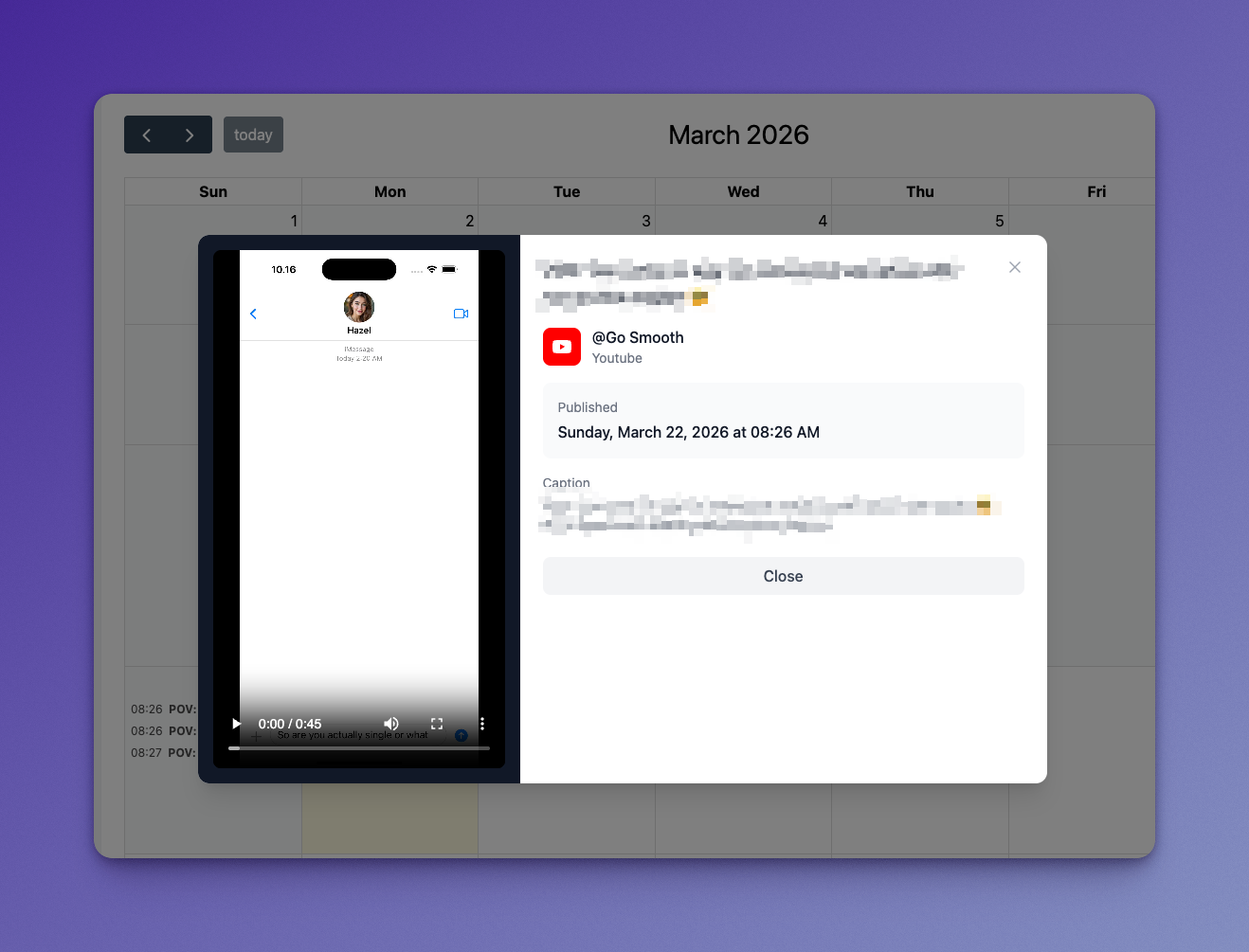
You can now see your published posts on the calendar alongside scheduled ones, navigate to past months, and preview videos directly in the post detail popup.
Added 9 new AI assistant tools for App Store Optimization and pricing management, bringing the total to 18 tools you can use with Claude and other AI assistants.
Added 9 new MCP tools for Claude Desktop users to research App Store keywords, analyze competitors, and manage subscription pricing directly from AI chat.
Press Cmd+K (or Ctrl+K) anywhere in the app to instantly search your videos, posts, and apps. Find what you need without navigating through pages.
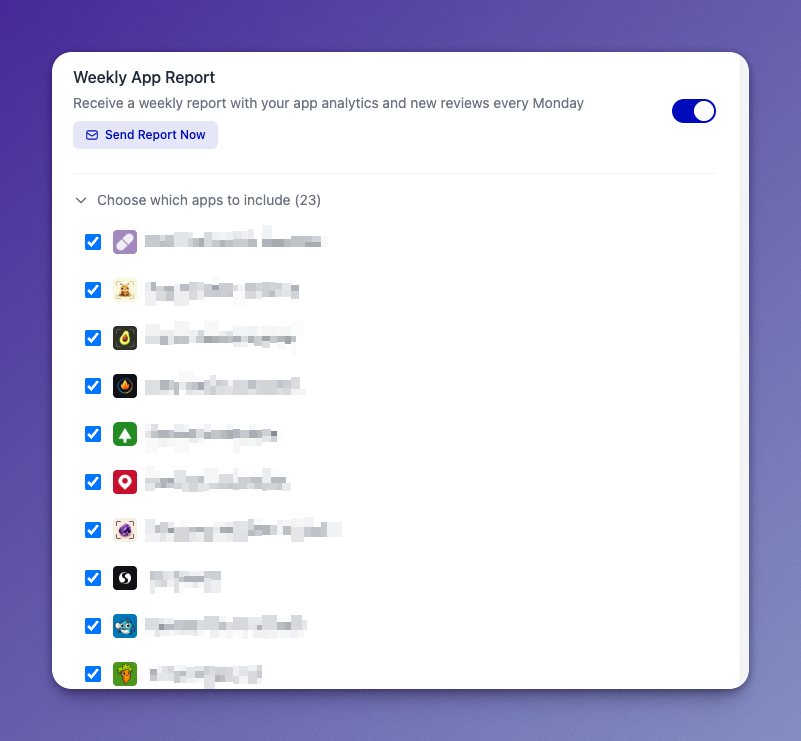
Fixed checkbox persistence issues and improved app filtering to ensure your weekly reports include all the right apps and save your preferences correctly.
Stay up-to-date with new features and vote on upcoming improvements in our new What's New section. See what we've shipped and what's coming next.
Added a powerful search feature accessible from anywhere in the app with Cmd+K (or Ctrl+K). Search across videos, posts, and apps with organized results and a clean modal interface.
Dashboard now shows key performance metrics at the top with sparkline charts and trend indicators, giving you immediate visibility into your content performance.
Get instant help with our new live chat widget available on the landing page and dashboard. Chat support is ready to assist you with any questions.
Get a helpful warning when your TikTok captions exceed the 5 hashtag limit, with live updates as you type.
Added live warnings when your TikTok captions exceed the 5 hashtag limit, showing a red counter next to the character count.
Added a public changelog to track all product updates and a roadmap where users can vote on upcoming features. Includes admin management pages and GitHub integration for automatic updates.
Fixed TikTok stats tracking, improved error handling, better dark mode contrast, protected video deletion when posts are active, and many other small improvements.
Scheduled posts now send one grouped notification and confirmation email instead of separate messages for each platform.
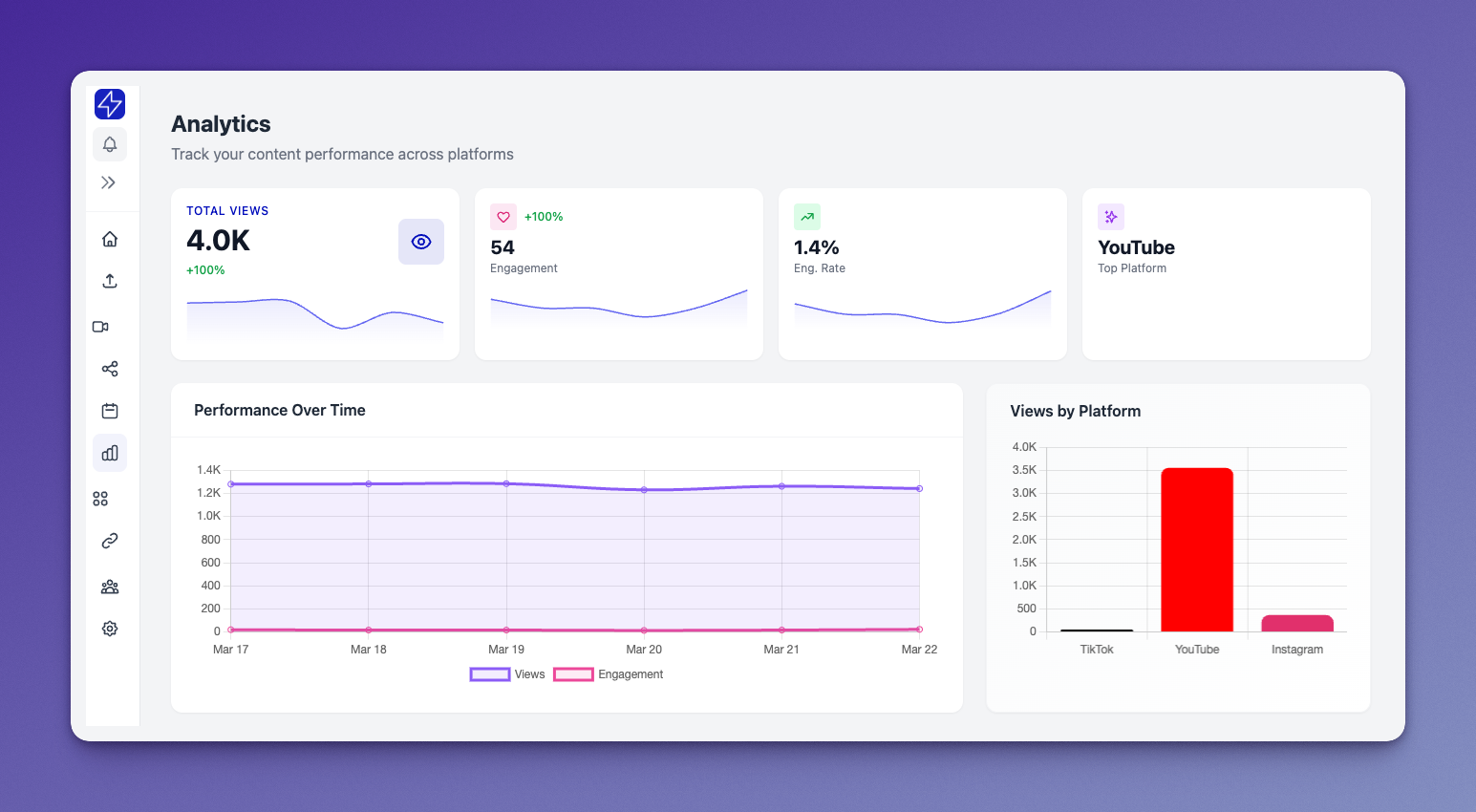
Added mini trend charts to performance stats, fixed Instagram analytics permissions, made time period filters work across all sections, and improved top posts with clickable links.
Posts are now grouped by video on the calendar, show publishing status with platform badges, and include a sidebar badge showing your pending posts count.
Better timezone controls with searchable picker, visual time previews, and the ability to reschedule posts by dragging them on the calendar or using the reschedule button.
Connect your account to Claude Desktop, ChatGPT, or other AI tools to manage posts, view analytics, and schedule content directly from your AI assistant.
